Social recovery allows users to regain access to their accounts without needing a 12-word seed phrase. This article explains how Openfort's smart accounts use "Guardians" to make Web3 wallets as secure and easy to recover as a standard email account.
Build with Openfort embedded wallets — non-custodial wallets backed by smart accounts, with email, social, and passkey login built in.
What is a Social Recoverable Account?
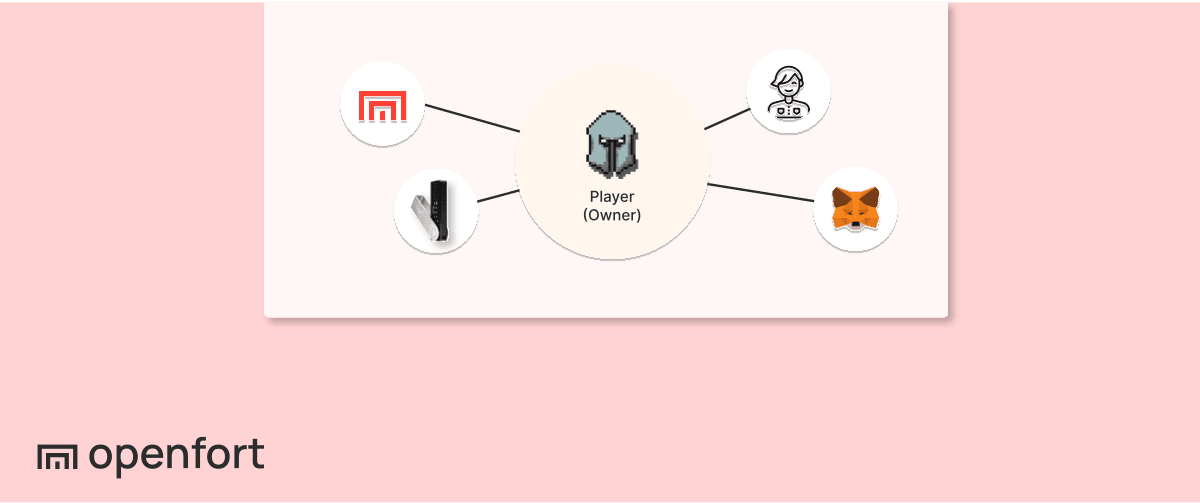
A Social Recoverable Account is a type of smart wallet that uses a list of trusted contacts, known as Guardians, to help the owner recover access if they lose their key. Instead of relying on a seed phrase that can be lost or stolen, the user can ask their Guardians (which could be the game studio, a second device, or a friend) to sign a transaction that resets the account's ownership to a new key.
Social recovery uses smart contracts to add a layer of security. If a player loses their private key, they initiate a recovery process. Once a threshold of Guardians approves the request, the account is unlocked. With Openfort, Guardians can sign these requests through our API, meaning they don't have to pay gas fees to help a friend recover their account.
Openfort Recovery Design
Openfort Recovery Design is inspired by the Social Recovery systems implemented by Argent. The owner of the wallet is always in full control, and a threshold is assigned for a minimum number of guardians to recover the wallet.

The owner can:
- Propose a new guardian.
- Cancel the proposal of a new guardian.
- Revoke a guardian.
- Cancel the revocation of a new guardian.
- Cancel the recovery mode.
- Transfer the ownership of the account (2 step process).
A guardian can:
- Start a recovery process.
- Lock and unlock the account for a period of time (
lockPeriod).
Anyone can:
- When a guardian has been proposed for enough time (
securityPeriod), confirm its proposal. - When a guardian has been revoked for enough time (
securityPeriod), confirm its revocation. - When in recovery mode, submit the list of needed signatures (from half of the guardians) to complete the recovery of the account.
Recovery Walkthrough
Given a player that has already connected their self-custodial wallet and Openfort has already deployed a smart wallet, we’re looking at an example where Openfort is by default the only guardian to recover the account.

This is just for demonstration purposes. In reality the players with self-custodial wallets have full control of their smart accounts and can decide who to add or remove as guardians. As a game developer you can suggest a friendly configuration where the game is one of the guardians to ease the recoverability process of the account.
When "Start Recovery Process", this action calls the start recovery function in the contract, signaling the default Guardian (Openfort in this case) to initiate the recovery process.
Openfort (the guardian) has 2 days to complete the recovery process (gather all required signatures).Once signed, it approves the recovery process and the ownership of the account changes to the new address specified during the recovery initiation.
In the event of the owner’s private key being found or the process being started by a malicious guardian, the owner can cancel the recovery process anytime before being completed.
Trying out Openfort's Sample
For developers eager to dive into the code Openfort has made their contracts available in the Openfort Contract Repository and the samples.
To get started with the sample:
- Clone the Sample Repository: This is the first step to accessing the sample code.
- Setting up the Environment: Before diving into the code, ensure you've set up the environment correctly. Create the
.envfile from the.env.localexample and populate it with the necessary information. All the required details can be fetched from the Openfort dashboard. - Starting the Sample Application: Once everything is set up, execute
yarnand thenyarn startto get the sample application running.
Wrapping up
Excited to use recoverable accounts in your game? Let's get started by looking at our documentation and our video walkthrough for more.