> **Can't find what you're looking for?** Use `search_docs` on the docs MCP server at `https://www.openfort.io/api/mcp` to find what you need.
>
> **Have feedback?** Use `submit_feedback` on the same MCP server.
# Webhooks
Openfort uses webhooks to push real-time notifications to your backend. Every webhook is an HTTPS `POST` with a JSON body, so you can react to on-chain and account events as they happen — for example to:
* Grant a user a game item once their transaction is confirmed
* Store every transaction event in your own database for reporting and retention
* Fulfil an order the moment a [funding](https://www.openfort.io/docs/configuration/funding) session settles
## The webhook object
Every webhook shares the same envelope. Branch on `type`, then read the affected object from `data`:
```json [Webhook Object]
{
"data": { /* the object that changed — shape depends on `type` */ },
"type": "transaction_intent.successful",
"date": 1689869074
}
```
| Field | Type | Description |
| ------ | ------ | ----------- |
| `data` | object | The object affected by the event. Its shape depends on `type` — see [Event payloads](#event-payloads). |
| `type` | string | The event that fired — see [Event types](#event-types). |
| `date` | number | Unix timestamp (seconds) when the event was emitted. |
## Event types
The `type` field is one of the following, grouped by the object it concerns:
| Category | `type` | Fires when |
| --- | --- | --- |
| **Transaction intents** | `transaction_intent.broadcast` | The transaction intent was broadcast to the network |
| | `transaction_intent.successful` | The transaction intent arrived on-chain and is confirmed |
| | `transaction_intent.failed` | The transaction intent arrived on-chain and reverted |
| | `transaction_intent.cancelled` | The transaction intent's parameters were not met |
| **Solana transactions** | `solana_transaction.broadcast` | A sponsored Solana transaction was signed and submitted |
| | `solana_transaction.successful` | A sponsored Solana transaction was confirmed on-chain |
| | `solana_transaction.failed` | A sponsored Solana transaction failed on-chain or expired |
| **Users & accounts** | `user.created` | A new user was created |
| | `user.updated` | A user was updated (email/phone verified, social account linked or unlinked) |
| | `user.deleted` | A user was deleted |
| | `account.created` | A new account (smart account, EOA, …) was created for a user |
| **Balances** | `balance.project` | The project balance dropped below your configured threshold |
| | `balance.contract` | A watched contract balance dropped below your configured threshold |
| | `balance.dev_account` | A backend wallet balance dropped below your configured threshold |
| **Funding** | `funding.session.updated` | A [funding](https://www.openfort.io/docs/configuration/funding) session changed status |
| **Other** | `test` | A test event sent from the dashboard |
:::note
The `balance.*` topics only fire once you define a threshold. Set it from the dashboard on the [**Notifications → Events**](https://dashboard.openfort.io/events) tab, or via the API — see [Set a balance threshold](https://www.openfort.io/docs/configuration/notifications#set-a-balance-threshold).
:::
## Receiving webhooks
### Register your endpoint
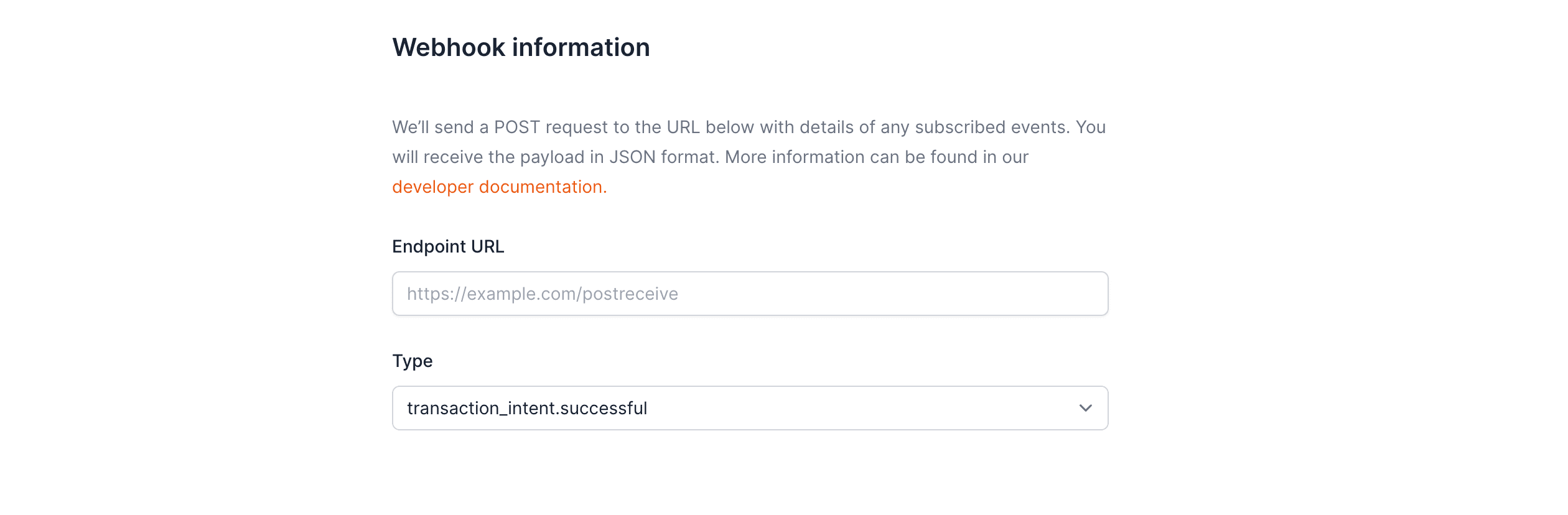
Register your publicly accessible HTTPS URL in the Openfort [dashboard](https://dashboard.openfort.io/webhooks), then choose the events you want to receive.
:::tip
You can tunnel to a localhost server with a tool like [ngrok](https://ngrok.com/download) — for example `https://8733-191-204-177-89.sa.ngrok.io/webhooks`.
:::
 ### Verify the signature
Every webhook Openfort delivers includes an `openfort-signature` header: an HMAC-SHA256 hex digest of the **raw** request body, computed with your webhook signing key (the `whsec_...` value shown in the dashboard). Verify it on every request before trusting the payload.
The easiest way is the [Openfort Node SDK's](https://www.npmjs.com/package/@openfort/openfort-node) `constructWebhookEvent` method — pass it the raw body and the signature header, and it returns a typed, verified event. See the [full webhook example](https://github.com/openfort-xyz/openfort-node/tree/main/examples/webhook) in the Node SDK repository.
```ts [Node.js]
import Openfort from '@openfort/openfort-node';
app.post(
'/webhook',
express.raw({ type: 'application/json' }),
async (req: Request, _res: Response) => {
const openfort = new Openfort(process.env.OPENFORT_SECRET_KEY)
try {
const event = await openfort.constructWebhookEvent(
req.body.toString(),
req.headers['openfort-signature']
)
switch (event.type) {
case "transaction_intent.successful":
console.log(`TransactionIntent ID: ${event.data.id}`)
break
case "transaction_intent.failed":
console.log(`TransactionIntent ID: ${event.data.id}`)
break
case "user.created":
console.log(`User created: ${event.data.id}`)
break
case "user.updated":
console.log(`User updated: ${event.data.id}, change: ${event.data.change}`)
break
case "user.deleted":
console.log(`User deleted: ${event.data.id}`)
break
case "account.created":
console.log(`Account created: ${event.data.id}, address: ${event.data.address}`)
break
default:
console.log(`Unhandled event type ${event.type}`);
}
} catch (e) {
console.error((e as Error).message)
}
}
)
```
If you'd rather verify the signature yourself, recompute the HMAC and reject any request whose signature is missing or doesn't match. Use the **raw** body (not the parsed JSON) — any reserialization changes the bytes and breaks the comparison.
```ts [TypeScript]
import express, { type Request, type Response } from 'express'
import { createHmac, timingSafeEqual } from 'node:crypto'
const WEBHOOK_SIGNING_KEY = process.env.OPENFORT_WEBHOOK_SIGNING_KEY ?? ''
const SIGNATURE_HEADER = 'openfort-signature'
function verifySignature(body: Buffer, received: string): boolean {
const expected = createHmac('sha256', WEBHOOK_SIGNING_KEY).update(body).digest('hex')
const expectedBuf = Buffer.from(expected, 'utf8')
const receivedBuf = Buffer.from(received, 'utf8')
if (expectedBuf.length !== receivedBuf.length) return false
return timingSafeEqual(expectedBuf, receivedBuf)
}
const app = express()
app.post(
'/get-webhook',
express.raw({ type: 'application/json' }),
(req: Request, res: Response) => {
const received = req.header(SIGNATURE_HEADER)
if (!received) {
console.log('Rejected: missing signature header')
return res.status(401).send('Missing signature')
}
if (!verifySignature(req.body, received)) {
console.log('Rejected: invalid signature')
return res.status(401).send('Invalid signature')
}
console.log(`[${new Date().toISOString()}] Webhook received`)
console.log(`Body: ${req.body.toString('utf8')}`)
res.status(200).send('OK')
},
)
const port = 8077
app.listen(port, () => {
console.log(`Webhook listener running on http://localhost:${port}/get-webhook`)
})
```
:::warning
Always use a constant-time comparison (such as `crypto.timingSafeEqual`) when checking the signature. A regular string equality check leaks timing information that can be used to forge a valid signature.
:::
### Confirm delivery
:::tip
Your endpoint must return a 2xx (status code 200–299) response for the webhook to be marked as delivered. Any other status (including 3xx) is treated as a failed delivery.
:::
Send a few test transactions to confirm your endpoint receives the events. You can control how many block confirmations to wait before being notified that a transaction made it on-chain — the default is `0` (notify as soon as it arrives). Set the `confirmationBlocks` body parameter when creating the transaction intent.
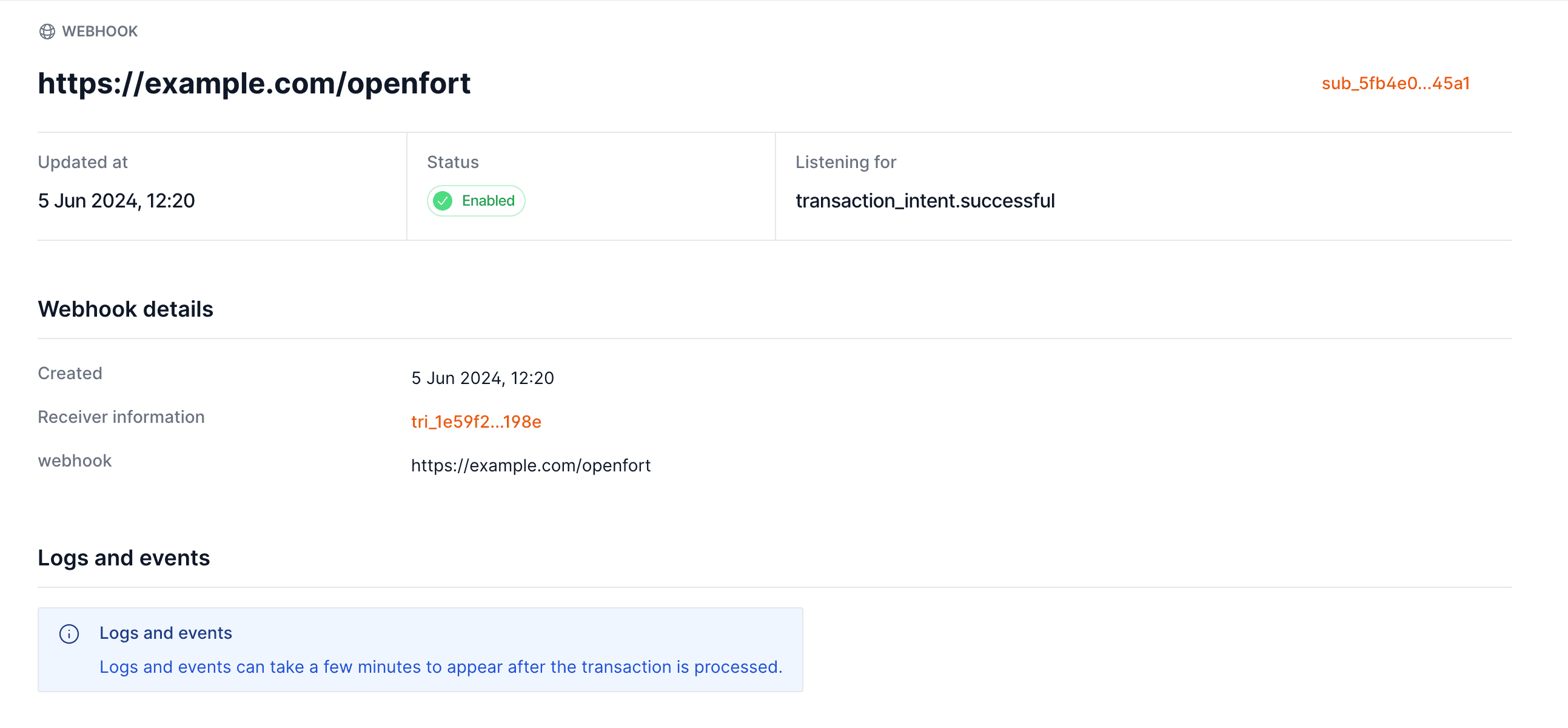
Inspect every attempt — delivery status, response code, and payload — in the dashboard webhook logs:
### Verify the signature
Every webhook Openfort delivers includes an `openfort-signature` header: an HMAC-SHA256 hex digest of the **raw** request body, computed with your webhook signing key (the `whsec_...` value shown in the dashboard). Verify it on every request before trusting the payload.
The easiest way is the [Openfort Node SDK's](https://www.npmjs.com/package/@openfort/openfort-node) `constructWebhookEvent` method — pass it the raw body and the signature header, and it returns a typed, verified event. See the [full webhook example](https://github.com/openfort-xyz/openfort-node/tree/main/examples/webhook) in the Node SDK repository.
```ts [Node.js]
import Openfort from '@openfort/openfort-node';
app.post(
'/webhook',
express.raw({ type: 'application/json' }),
async (req: Request, _res: Response) => {
const openfort = new Openfort(process.env.OPENFORT_SECRET_KEY)
try {
const event = await openfort.constructWebhookEvent(
req.body.toString(),
req.headers['openfort-signature']
)
switch (event.type) {
case "transaction_intent.successful":
console.log(`TransactionIntent ID: ${event.data.id}`)
break
case "transaction_intent.failed":
console.log(`TransactionIntent ID: ${event.data.id}`)
break
case "user.created":
console.log(`User created: ${event.data.id}`)
break
case "user.updated":
console.log(`User updated: ${event.data.id}, change: ${event.data.change}`)
break
case "user.deleted":
console.log(`User deleted: ${event.data.id}`)
break
case "account.created":
console.log(`Account created: ${event.data.id}, address: ${event.data.address}`)
break
default:
console.log(`Unhandled event type ${event.type}`);
}
} catch (e) {
console.error((e as Error).message)
}
}
)
```
If you'd rather verify the signature yourself, recompute the HMAC and reject any request whose signature is missing or doesn't match. Use the **raw** body (not the parsed JSON) — any reserialization changes the bytes and breaks the comparison.
```ts [TypeScript]
import express, { type Request, type Response } from 'express'
import { createHmac, timingSafeEqual } from 'node:crypto'
const WEBHOOK_SIGNING_KEY = process.env.OPENFORT_WEBHOOK_SIGNING_KEY ?? ''
const SIGNATURE_HEADER = 'openfort-signature'
function verifySignature(body: Buffer, received: string): boolean {
const expected = createHmac('sha256', WEBHOOK_SIGNING_KEY).update(body).digest('hex')
const expectedBuf = Buffer.from(expected, 'utf8')
const receivedBuf = Buffer.from(received, 'utf8')
if (expectedBuf.length !== receivedBuf.length) return false
return timingSafeEqual(expectedBuf, receivedBuf)
}
const app = express()
app.post(
'/get-webhook',
express.raw({ type: 'application/json' }),
(req: Request, res: Response) => {
const received = req.header(SIGNATURE_HEADER)
if (!received) {
console.log('Rejected: missing signature header')
return res.status(401).send('Missing signature')
}
if (!verifySignature(req.body, received)) {
console.log('Rejected: invalid signature')
return res.status(401).send('Invalid signature')
}
console.log(`[${new Date().toISOString()}] Webhook received`)
console.log(`Body: ${req.body.toString('utf8')}`)
res.status(200).send('OK')
},
)
const port = 8077
app.listen(port, () => {
console.log(`Webhook listener running on http://localhost:${port}/get-webhook`)
})
```
:::warning
Always use a constant-time comparison (such as `crypto.timingSafeEqual`) when checking the signature. A regular string equality check leaks timing information that can be used to forge a valid signature.
:::
### Confirm delivery
:::tip
Your endpoint must return a 2xx (status code 200–299) response for the webhook to be marked as delivered. Any other status (including 3xx) is treated as a failed delivery.
:::
Send a few test transactions to confirm your endpoint receives the events. You can control how many block confirmations to wait before being notified that a transaction made it on-chain — the default is `0` (notify as soon as it arrives). Set the `confirmationBlocks` body parameter when creating the transaction intent.
Inspect every attempt — delivery status, response code, and payload — in the dashboard webhook logs:
 ## Event payloads
This section shows the `data` object delivered with each event, grouped by category. Every payload is wrapped in the [webhook envelope](#the-webhook-object) shown above.
### Transaction intent events
Fired as an EVM transaction intent moves on-chain. `data` is a transaction intent object.
```json [Webhook Object]
{
"data": {
"id": "tin_c502d628-5bb3-42f2-b8f5-62ba4d71df3a",
"createdAt": 1689869074,
"object": "transactionIntent"
// …remaining transaction intent fields
},
"type": "transaction_intent.successful",
"date": 1689869074
}
```
### User and account events
#### `user.created`
Triggered when a new user signs up in your project.
```json [Webhook Object]
{
"data": {
"id": "usr_...",
"email": "user@example.com",
"name": "John Doe",
"createdAt": 1689869074
},
"type": "user.created",
"date": 1689869074
}
```
#### `user.updated`
Triggered when a user's profile is updated. The `change` field indicates what was updated. Possible values:
* `email_verified`: The user's email has been verified
* `phone_verified`: The user's phone number has been verified
* `social_data_linked`: A social account or wallet has been linked to the user
* `social_data_unlinked`: A social account or wallet has been unlinked from the user
```json [Email Verified]
{
"data": {
"id": "usr_...",
"updatedAt": 1689869074,
"change": "email_verified",
"email": "user@example.com"
},
"type": "user.updated",
"date": 1689869074
}
```
```json [Phone Verified]
{
"data": {
"id": "usr_...",
"updatedAt": 1689869074,
"change": "phone_verified",
"phoneNumber": "+1234567890"
},
"type": "user.updated",
"date": 1689869074
}
```
```json [Social Account Linked]
{
"data": {
"id": "usr_...",
"updatedAt": 1689869074,
"change": "social_data_linked",
"linkedAccount": {
"provider": "google",
"accountId": "provider-account-id"
}
},
"type": "user.updated",
"date": 1689869074
}
```
```json [Social Account Unlinked]
{
"data": {
"id": "usr_...",
"updatedAt": 1689869074,
"change": "social_data_unlinked",
"unlinkedAccount": {
"provider": "google",
"accountId": "provider-account-id"
}
},
"type": "user.updated",
"date": 1689869074
}
```
#### `user.deleted`
Triggered when a user is deleted from your project.
```json [Webhook Object]
{
"data": {
"id": "usr_...",
"deletedAt": 1689869074
},
"type": "user.deleted",
"date": 1689869074
}
```
#### `account.created`
Triggered when a new blockchain account is created for a user.
```json [Webhook Object]
{
"data": {
"id": "acc_...",
"change": "account_created",
"address": "0x1234...abcd",
"accountType": "SMART",
"chainId": 80002,
"chainType": "EVM",
"createdAt": 1689869074
},
"type": "account.created",
"date": 1689869074
}
```
### Solana transaction events
Fired for transactions sponsored by your project on Solana via the [Solana Paymaster endpoints](https://www.openfort.io/docs/products/infrastructure/paymaster/solana/endpoints) (`signTransaction` / `signAndSendTransaction`). Each event carries the same `solanaTransaction` object — the `status` and optional `response` fields change as the transaction moves through its lifecycle.
Common fields on `data`:
| Field | Description |
|-------|-------------|
| `id` | Solana transaction identifier (`sol_`) — stable across all three events for the same transaction |
| `object` | Always `solanaTransaction` |
| `createdAt` | Unix timestamp (seconds) when the sponsorship was created |
| `chainId` | `1` for Solana mainnet-beta, `2` for Solana devnet |
| `sender` | The user wallet (base58) that signed the transaction |
| `method` | `signTransaction` or `signAndSendTransaction` |
| `transactionSignature` | Transaction signature (base58), or `null` if not available yet |
| `estimatedCost` | Estimated fee charged upfront, in lamports (string) |
| `response` | On-chain outcome — only present on `successful` and `failed` events |
#### `solana_transaction.broadcast`
Triggered as soon as Openfort signs the transaction and (for `signAndSendTransaction`) submits it to the Solana network. At this point the transaction has a signature but has not yet been confirmed on-chain.
```json [Webhook Object]
{
"data": {
"id": "sol_c502d628-5bb3-42f2-b8f5-62ba4d71df3a",
"object": "solanaTransaction",
"createdAt": 1689869074,
"chainId": 1,
"sender": "9xQeWvG816bUx9EPjHmaT23YvVM2ZWbrrpZb9PusVFin",
"method": "signAndSendTransaction",
"transactionSignature": "5j7s...nM2",
"estimatedCost": "50000"
},
"type": "solana_transaction.broadcast",
"date": 1689869074
}
```
#### `solana_transaction.successful`
Triggered when the transaction is confirmed (or finalized) on-chain. `response.fee` carries the actual fee paid in lamports, used to reconcile the upfront estimate.
```json [Webhook Object]
{
"data": {
"id": "sol_c502d628-5bb3-42f2-b8f5-62ba4d71df3a",
"object": "solanaTransaction",
"createdAt": 1689869074,
"chainId": 1,
"sender": "9xQeWvG816bUx9EPjHmaT23YvVM2ZWbrrpZb9PusVFin",
"method": "signAndSendTransaction",
"transactionSignature": "5j7s...nM2",
"estimatedCost": "50000",
"response": {
"fee": "12345"
}
},
"type": "solana_transaction.successful",
"date": 1689869120
}
```
#### `solana_transaction.failed`
Triggered when the transaction failed on-chain, or when its blockhash expired before it could be confirmed. `response.error.reason` tells you which:
* `transaction_failed`: the transaction was processed on-chain but reverted. `response.error.raw` contains the raw Solana error.
* `expired`: the blockhash expired (~90 s on Solana) and the transaction never landed. `transactionSignature` may be `null` if it was never submitted.
In both cases the upfront invoice is voided, so you are not billed for the failed attempt.
```json [Transaction failed on-chain]
{
"data": {
"id": "sol_c502d628-5bb3-42f2-b8f5-62ba4d71df3a",
"object": "solanaTransaction",
"createdAt": 1689869074,
"chainId": 1,
"sender": "9xQeWvG816bUx9EPjHmaT23YvVM2ZWbrrpZb9PusVFin",
"method": "signAndSendTransaction",
"transactionSignature": "5j7s...nM2",
"estimatedCost": "50000",
"response": {
"error": {
"reason": "transaction_failed",
"raw": { "InstructionError": [0, "Custom"] }
}
}
},
"type": "solana_transaction.failed",
"date": 1689869120
}
```
```json [Transaction expired before confirmation]
{
"data": {
"id": "sol_c502d628-5bb3-42f2-b8f5-62ba4d71df3a",
"object": "solanaTransaction",
"createdAt": 1689869074,
"chainId": 2,
"sender": "9xQeWvG816bUx9EPjHmaT23YvVM2ZWbrrpZb9PusVFin",
"method": "signTransaction",
"transactionSignature": null,
"estimatedCost": "50000",
"response": {
"error": {
"reason": "expired"
}
}
},
"type": "solana_transaction.failed",
"date": 1689869210
}
```
### Funding events
Fired when a [funding](https://www.openfort.io/docs/configuration/funding) session changes status. A single event — `funding.session.updated` — carries every transition; its `data` is the full funding session, so branch on `data.status`.
#### `funding.session.updated`
```json [Webhook Object]
{
"data": {
"id": "fnd_...",
"object": "fundingSession",
"status": "succeeded",
"target": { "chain": "eip155:8453", "currency": "0x8335...2913", "address": "0xUser..." },
"paymentMethod": {
"type": "evm",
"source": { "chain": "eip155:137", "currency": "0x3c49...3359", "amount": "10000000" },
"receiverAddress": "0x...",
"fees": []
},
"externalId": "order_42",
"createdAt": 1781250000,
"expiresAt": 1781336400
},
"type": "funding.session.updated",
"date": 1781250000
}
```
`data.status` is one of `waiting_payment`, `processing`, `succeeded`, `bounced`, or `expired`.
#### Acting on each status
What each `data.status` means, and the typical response:
| `data.status` | What it means | Typical action |
| --- | --- | --- |
| `waiting_payment` | Deposit address shown; awaiting the transfer. | Show "waiting for your transfer". |
| `processing` | Deposit detected; bridging to the destination. | Show "confirming" — don't fulfil yet. |
| `succeeded` | Funds delivered to the destination wallet. | Fulfil the order, credit the user. |
| `bounced` | Delivery failed; funds refunded on the source chain. | Notify the user; offer a retry. |
| `expired` | No deposit arrived in time. | Clear the pending intent. |
:::tip
Use `externalId` (set when you create the session) to correlate a webhook back to your own order or user record.
:::
:::warning
Webhooks are at‑least‑once. De‑duplicate on the session `id` + `status`, and treat a missing webhook as a cue to fall back to [`get`](https://www.openfort.io/docs/configuration/funding/headless) — never as proof a deposit failed.
:::
## Event payloads
This section shows the `data` object delivered with each event, grouped by category. Every payload is wrapped in the [webhook envelope](#the-webhook-object) shown above.
### Transaction intent events
Fired as an EVM transaction intent moves on-chain. `data` is a transaction intent object.
```json [Webhook Object]
{
"data": {
"id": "tin_c502d628-5bb3-42f2-b8f5-62ba4d71df3a",
"createdAt": 1689869074,
"object": "transactionIntent"
// …remaining transaction intent fields
},
"type": "transaction_intent.successful",
"date": 1689869074
}
```
### User and account events
#### `user.created`
Triggered when a new user signs up in your project.
```json [Webhook Object]
{
"data": {
"id": "usr_...",
"email": "user@example.com",
"name": "John Doe",
"createdAt": 1689869074
},
"type": "user.created",
"date": 1689869074
}
```
#### `user.updated`
Triggered when a user's profile is updated. The `change` field indicates what was updated. Possible values:
* `email_verified`: The user's email has been verified
* `phone_verified`: The user's phone number has been verified
* `social_data_linked`: A social account or wallet has been linked to the user
* `social_data_unlinked`: A social account or wallet has been unlinked from the user
```json [Email Verified]
{
"data": {
"id": "usr_...",
"updatedAt": 1689869074,
"change": "email_verified",
"email": "user@example.com"
},
"type": "user.updated",
"date": 1689869074
}
```
```json [Phone Verified]
{
"data": {
"id": "usr_...",
"updatedAt": 1689869074,
"change": "phone_verified",
"phoneNumber": "+1234567890"
},
"type": "user.updated",
"date": 1689869074
}
```
```json [Social Account Linked]
{
"data": {
"id": "usr_...",
"updatedAt": 1689869074,
"change": "social_data_linked",
"linkedAccount": {
"provider": "google",
"accountId": "provider-account-id"
}
},
"type": "user.updated",
"date": 1689869074
}
```
```json [Social Account Unlinked]
{
"data": {
"id": "usr_...",
"updatedAt": 1689869074,
"change": "social_data_unlinked",
"unlinkedAccount": {
"provider": "google",
"accountId": "provider-account-id"
}
},
"type": "user.updated",
"date": 1689869074
}
```
#### `user.deleted`
Triggered when a user is deleted from your project.
```json [Webhook Object]
{
"data": {
"id": "usr_...",
"deletedAt": 1689869074
},
"type": "user.deleted",
"date": 1689869074
}
```
#### `account.created`
Triggered when a new blockchain account is created for a user.
```json [Webhook Object]
{
"data": {
"id": "acc_...",
"change": "account_created",
"address": "0x1234...abcd",
"accountType": "SMART",
"chainId": 80002,
"chainType": "EVM",
"createdAt": 1689869074
},
"type": "account.created",
"date": 1689869074
}
```
### Solana transaction events
Fired for transactions sponsored by your project on Solana via the [Solana Paymaster endpoints](https://www.openfort.io/docs/products/infrastructure/paymaster/solana/endpoints) (`signTransaction` / `signAndSendTransaction`). Each event carries the same `solanaTransaction` object — the `status` and optional `response` fields change as the transaction moves through its lifecycle.
Common fields on `data`:
| Field | Description |
|-------|-------------|
| `id` | Solana transaction identifier (`sol_`) — stable across all three events for the same transaction |
| `object` | Always `solanaTransaction` |
| `createdAt` | Unix timestamp (seconds) when the sponsorship was created |
| `chainId` | `1` for Solana mainnet-beta, `2` for Solana devnet |
| `sender` | The user wallet (base58) that signed the transaction |
| `method` | `signTransaction` or `signAndSendTransaction` |
| `transactionSignature` | Transaction signature (base58), or `null` if not available yet |
| `estimatedCost` | Estimated fee charged upfront, in lamports (string) |
| `response` | On-chain outcome — only present on `successful` and `failed` events |
#### `solana_transaction.broadcast`
Triggered as soon as Openfort signs the transaction and (for `signAndSendTransaction`) submits it to the Solana network. At this point the transaction has a signature but has not yet been confirmed on-chain.
```json [Webhook Object]
{
"data": {
"id": "sol_c502d628-5bb3-42f2-b8f5-62ba4d71df3a",
"object": "solanaTransaction",
"createdAt": 1689869074,
"chainId": 1,
"sender": "9xQeWvG816bUx9EPjHmaT23YvVM2ZWbrrpZb9PusVFin",
"method": "signAndSendTransaction",
"transactionSignature": "5j7s...nM2",
"estimatedCost": "50000"
},
"type": "solana_transaction.broadcast",
"date": 1689869074
}
```
#### `solana_transaction.successful`
Triggered when the transaction is confirmed (or finalized) on-chain. `response.fee` carries the actual fee paid in lamports, used to reconcile the upfront estimate.
```json [Webhook Object]
{
"data": {
"id": "sol_c502d628-5bb3-42f2-b8f5-62ba4d71df3a",
"object": "solanaTransaction",
"createdAt": 1689869074,
"chainId": 1,
"sender": "9xQeWvG816bUx9EPjHmaT23YvVM2ZWbrrpZb9PusVFin",
"method": "signAndSendTransaction",
"transactionSignature": "5j7s...nM2",
"estimatedCost": "50000",
"response": {
"fee": "12345"
}
},
"type": "solana_transaction.successful",
"date": 1689869120
}
```
#### `solana_transaction.failed`
Triggered when the transaction failed on-chain, or when its blockhash expired before it could be confirmed. `response.error.reason` tells you which:
* `transaction_failed`: the transaction was processed on-chain but reverted. `response.error.raw` contains the raw Solana error.
* `expired`: the blockhash expired (~90 s on Solana) and the transaction never landed. `transactionSignature` may be `null` if it was never submitted.
In both cases the upfront invoice is voided, so you are not billed for the failed attempt.
```json [Transaction failed on-chain]
{
"data": {
"id": "sol_c502d628-5bb3-42f2-b8f5-62ba4d71df3a",
"object": "solanaTransaction",
"createdAt": 1689869074,
"chainId": 1,
"sender": "9xQeWvG816bUx9EPjHmaT23YvVM2ZWbrrpZb9PusVFin",
"method": "signAndSendTransaction",
"transactionSignature": "5j7s...nM2",
"estimatedCost": "50000",
"response": {
"error": {
"reason": "transaction_failed",
"raw": { "InstructionError": [0, "Custom"] }
}
}
},
"type": "solana_transaction.failed",
"date": 1689869120
}
```
```json [Transaction expired before confirmation]
{
"data": {
"id": "sol_c502d628-5bb3-42f2-b8f5-62ba4d71df3a",
"object": "solanaTransaction",
"createdAt": 1689869074,
"chainId": 2,
"sender": "9xQeWvG816bUx9EPjHmaT23YvVM2ZWbrrpZb9PusVFin",
"method": "signTransaction",
"transactionSignature": null,
"estimatedCost": "50000",
"response": {
"error": {
"reason": "expired"
}
}
},
"type": "solana_transaction.failed",
"date": 1689869210
}
```
### Funding events
Fired when a [funding](https://www.openfort.io/docs/configuration/funding) session changes status. A single event — `funding.session.updated` — carries every transition; its `data` is the full funding session, so branch on `data.status`.
#### `funding.session.updated`
```json [Webhook Object]
{
"data": {
"id": "fnd_...",
"object": "fundingSession",
"status": "succeeded",
"target": { "chain": "eip155:8453", "currency": "0x8335...2913", "address": "0xUser..." },
"paymentMethod": {
"type": "evm",
"source": { "chain": "eip155:137", "currency": "0x3c49...3359", "amount": "10000000" },
"receiverAddress": "0x...",
"fees": []
},
"externalId": "order_42",
"createdAt": 1781250000,
"expiresAt": 1781336400
},
"type": "funding.session.updated",
"date": 1781250000
}
```
`data.status` is one of `waiting_payment`, `processing`, `succeeded`, `bounced`, or `expired`.
#### Acting on each status
What each `data.status` means, and the typical response:
| `data.status` | What it means | Typical action |
| --- | --- | --- |
| `waiting_payment` | Deposit address shown; awaiting the transfer. | Show "waiting for your transfer". |
| `processing` | Deposit detected; bridging to the destination. | Show "confirming" — don't fulfil yet. |
| `succeeded` | Funds delivered to the destination wallet. | Fulfil the order, credit the user. |
| `bounced` | Delivery failed; funds refunded on the source chain. | Notify the user; offer a retry. |
| `expired` | No deposit arrived in time. | Clear the pending intent. |
:::tip
Use `externalId` (set when you create the session) to correlate a webhook back to your own order or user record.
:::
:::warning
Webhooks are at‑least‑once. De‑duplicate on the session `id` + `status`, and treat a missing webhook as a cue to fall back to [`get`](https://www.openfort.io/docs/configuration/funding/headless) — never as proof a deposit failed.
:::