> **Can't find what you're looking for?** Use `search_docs` on the docs MCP server at `https://www.openfort.io/api/mcp` to find what you need.
>
> **Have feedback?** Use `submit_feedback` on the same MCP server.
# Funding
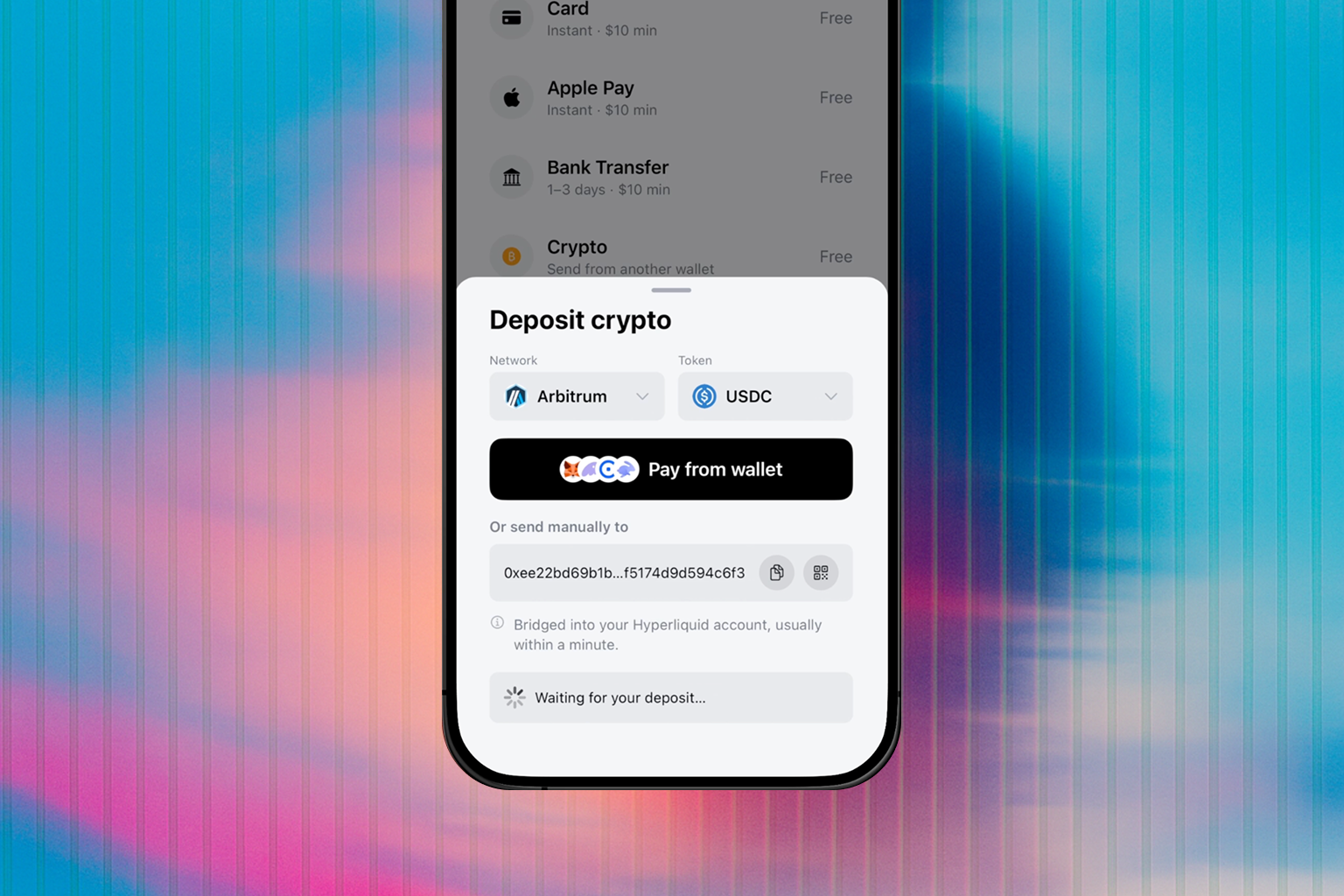
Funding lets a user add crypto to their Openfort wallet from **any chain, any token, or a centralized exchange — or buy it with Apple Pay, Google Pay, a card, or a bank transfer**. Crypto transfers mint a single deposit address per route and bridge/swap the inbound funds to the destination; fiat purchases settle straight into the wallet. Your users never have to think about networks or wrapping.
It is the same primitive whether a human taps a button or an agent calls an endpoint: one **funding session** with a destination and a source.
 ## Ways to integrate
Pick the surface that fits your app. They're all clients over the same session API, so you can mix them.
* [React modal](https://www.openfort.io/docs/products/embedded-wallet/react/ui/configuration#funding) — Drop-in Deposit flow in the @openfort/react wallet modal.
* [React hooks](https://www.openfort.io/docs/products/embedded-wallet/react/wallet/funding) — The useFunding, useFundingMethods, and useOnramp hooks for a custom React UI.
* [React Native](https://www.openfort.io/docs/products/embedded-wallet/react-native/wallet/funding) — Deposit hooks, Apple / Google Pay verification, and the onramp payment sheet.
* [JavaScript SDK](https://www.openfort.io/docs/products/embedded-wallet/javascript/signer/funding) — The openfort.funding client for any JavaScript runtime — browser, server, or agent.
* [Headless / API](https://www.openfort.io/docs/configuration/funding/headless) — The REST and session-model reference behind every funding integration.
## How a session works
A funding session is one deposit attempt against a destination: create it, attach a source, then watch it settle.
:::steps
### Create a session
Specify where the funds should land — a `target` of chain (CAIP‑2), token, and wallet address. You get back a session `id` and a `clientSecret`.
```ts
type FundingTarget = { chain: string; currency: string; address: string } // CAIP-2 destination
```
### Set a payment method
Commit the source the user will send from (an EVM or Solana wallet, or an exchange). This mints a **deposit address** and returns a QR + wallet deeplinks.
```ts
type FundingSource = { chain: string; currency: string; amount: string } // where the user sends from
```
### Poll until settled
Read the session back with `get`, or subscribe to [webhooks](https://www.openfort.io/docs/configuration/webhooks#funding-events), until it reaches one of the terminal states below.
:::
### Session lifecycle
A session advances along a single path and stops at one of three terminal states.
requires\_payment\_method
→
waiting\_payment
→
processing
→
succeeded ✓
Instead of `succeeded`, a session can end at `bounced` (delivery failed, funds refunded) or `expired` (no deposit arrived). Both are terminal.
| Status | What it means | |
| --- | --- | --- |
| `requires_payment_method` | Session created; no source committed yet. | |
| `waiting_payment` | Deposit address minted; waiting for the inbound transfer. | |
| `processing` | Deposit detected; bridging/swapping to the destination. | |
| `succeeded` | Funds delivered to the destination wallet. | Terminal |
| `bounced` | Delivery failed; funds refunded on the source chain. | Terminal |
| `expired` | No deposit arrived before the session expired. | Terminal |
## Payment methods
A user can fund a wallet four ways. All but the exchange on-ramp run through the session lifecycle above.
| Method | How the user pays | Rail |
| --- | --- | --- |
| **Self-custody wallet** | Sends from MetaMask, Phantom, Coinbase Wallet… — deeplink or QR | Funding session — `paymentMethod` `evm` / `solana` |
| **Exchange withdrawal** | Withdraws from Binance / Coinbase to the deposit address (guided network, min, memo) | Funding session — deposit address on the crypto rail |
| **Exchange on-ramp** | Buys on an exchange on-ramp (Coinbase); delivered to the wallet | `pay_link` helper (not a session) |
| **Fiat onramp** | Apple Pay, Google Pay, card, or bank transfer | Funding session — `paymentMethod` `onramp` |
:::note
Every session payment method — crypto transfers and the fiat onramp alike — advances through the same statuses and emits [`funding.session.updated`](https://www.openfort.io/docs/configuration/webhooks#funding-events). Only the exchange on-ramp `pay_link` settles outside a session.
:::
## Fiat onramp
The fiat onramp is a session payment method (`type: 'onramp'`) — same session, same lifecycle, same webhooks as a crypto transfer. The user pays with **Apple Pay, Google Pay, a card, or a bank transfer** (ACH, SEPA, or Interac, resolved per region) and the purchase settles as USDC into the destination wallet.
Openfort resolves the provider and presentation for each buyer server-side — by method, region, and destination — so your app never handles provider keys or branding. A committed onramp payment method carries an `angle` telling you how to present it:
| `angle` | What you get | How to present it |
| --- | --- | --- |
| `popup` | A hosted checkout `url` | Open it in a popup or new tab — never an iframe (providers block framing). |
| `native` | An in-page payment `url` | Mount it as an Apple Pay / Google Pay sheet (the React modal and React Native payment sheet do this for you). |
| `embedded` | A provider element flow | The provider's headless elements render inside your page (React modal). |
### Enabling it
Fiat methods are **off by default** and fail closed — until you enable them, method resolution returns no fiat rows. Turn on the onramp and pick which methods show in the dashboard's **Funding** section (or via `PUT /v2/funding/config` with your secret key).
Two presentations are additionally gated on your own provider credentials, configured in the same place:
* **Native Apple Pay / Google Pay** (US) requires your Coinbase CDP keys. Without them the methods still resolve, degraded to the hosted checkout popup.
* **Stripe rails** require your Stripe secret key. The Link OAuth client is **optional** — with it, card checkout runs embedded in-page; without it, the same Stripe rows open the hosted popup on the secret key alone.
:::note
Fiat coverage is **mainnet-only**, delivering USDC on Base, Ethereum, Polygon, Arbitrum, Optimism, or Solana. A testnet destination resolves no fiat methods.
:::
## Credentials
Every funding call uses two credentials:
| Credential | Where it lives | Scope |
| --- | --- | --- |
| **Publishable key** (`pk_…`) | `Authorization: Bearer` header, client or server | Identifies your project. Safe to ship to the browser. |
| **`clientSecret`** | Returned by `create`; held by the client driving the session | Scopes reads and writes to that one session. Treat it like a one-time token — never log it or reuse it across sessions. |
:::note
A secret-key **server flow** — create a session for any user, list sessions across your project — is planned. Until then, both browser and server integrations authenticate with the publishable key plus the session `clientSecret`.
:::
## Hosted deposit page
The modal's **Transfer from wallet** method sends users to a standalone **deposit send page**:
* On mobile, the modal builds a one-tap deeplink that opens the page **inside the user's wallet app**.
* The wallet's in-app browser injects a provider — `window.ethereum` for EVM wallets, or the Solana provider (`window.solana` / the Solana Wallet Standard) when the embedded wallet is on Solana.
* The page reads the transfer from its URL and submits it through that provider.
* No backend, no session, and no Openfort SDK run on the page.
:::info
On **desktop**, "Transfer from wallet" sends it directly through the user's connected browser-extension wallet (MetaMask, Rabby, …).
:::
The page reads the transfer entirely from the query string:
| param | required | meaning |
| --- | --- | --- |
| `to` | yes | deposit address (the funds receiver) |
| `chainId` | yes | numeric source chain id (e.g. `42161`) |
| `token` | no | ERC-20 contract or SPL-token mint; omit for the chain's native token |
| `decimals` | no | token decimals (default `18`) |
| `symbol` | no | display symbol |
| `chain` | no | display chain name |
| `amount` | no | preset amount in base units; user-editable |
```
https://deposit.openfort.io?to=0xReceiver…&chainId=42161&token=0xaf88…5831&decimals=6&symbol=USDC&chain=Arbitrum&amount=10000000
```
What the page does, in order:
1. Shows the transfer for review.
2. Connects the injected wallet and switches to the source chain (EVM only — Solana has no chain switch).
3. Submits the transfer — `eth_sendTransaction` for EVM, `signAndSendTransaction` for Solana.
4. Shows the transaction hash on success.
It does **not** call back into a host app — track settlement with [Webhooks](https://www.openfort.io/docs/configuration/webhooks#funding-events) or by polling the session through the [Headless API](https://www.openfort.io/docs/configuration/funding/headless).
### Self-hosting
The page is a single static `index.html` — no build step, no third-party scripts. Host it at a domain root and point the modal at your copy with `uiConfig.funding.depositPageUrl` (default `https://deposit.openfort.io`):
```tsx
```
:::warning
This page triggers token transfers from the user's wallet, so the origin must be trusted. Serve it over HTTPS from a domain you control, keep it self-contained (no trackers or analytics), and review changes like any code that moves funds. The user still confirms the destination and amount in their wallet.
:::
:::tip
Building an agent or automated treasury? Funding is agent‑native: give it a destination and it returns a deposit address that settles token X on chain Y into the wallet — no human in the loop. See the [REST reference](https://www.openfort.io/docs/configuration/funding/headless).
:::
## Ways to integrate
Pick the surface that fits your app. They're all clients over the same session API, so you can mix them.
* [React modal](https://www.openfort.io/docs/products/embedded-wallet/react/ui/configuration#funding) — Drop-in Deposit flow in the @openfort/react wallet modal.
* [React hooks](https://www.openfort.io/docs/products/embedded-wallet/react/wallet/funding) — The useFunding, useFundingMethods, and useOnramp hooks for a custom React UI.
* [React Native](https://www.openfort.io/docs/products/embedded-wallet/react-native/wallet/funding) — Deposit hooks, Apple / Google Pay verification, and the onramp payment sheet.
* [JavaScript SDK](https://www.openfort.io/docs/products/embedded-wallet/javascript/signer/funding) — The openfort.funding client for any JavaScript runtime — browser, server, or agent.
* [Headless / API](https://www.openfort.io/docs/configuration/funding/headless) — The REST and session-model reference behind every funding integration.
## How a session works
A funding session is one deposit attempt against a destination: create it, attach a source, then watch it settle.
:::steps
### Create a session
Specify where the funds should land — a `target` of chain (CAIP‑2), token, and wallet address. You get back a session `id` and a `clientSecret`.
```ts
type FundingTarget = { chain: string; currency: string; address: string } // CAIP-2 destination
```
### Set a payment method
Commit the source the user will send from (an EVM or Solana wallet, or an exchange). This mints a **deposit address** and returns a QR + wallet deeplinks.
```ts
type FundingSource = { chain: string; currency: string; amount: string } // where the user sends from
```
### Poll until settled
Read the session back with `get`, or subscribe to [webhooks](https://www.openfort.io/docs/configuration/webhooks#funding-events), until it reaches one of the terminal states below.
:::
### Session lifecycle
A session advances along a single path and stops at one of three terminal states.
requires\_payment\_method
→
waiting\_payment
→
processing
→
succeeded ✓
Instead of `succeeded`, a session can end at `bounced` (delivery failed, funds refunded) or `expired` (no deposit arrived). Both are terminal.
| Status | What it means | |
| --- | --- | --- |
| `requires_payment_method` | Session created; no source committed yet. | |
| `waiting_payment` | Deposit address minted; waiting for the inbound transfer. | |
| `processing` | Deposit detected; bridging/swapping to the destination. | |
| `succeeded` | Funds delivered to the destination wallet. | Terminal |
| `bounced` | Delivery failed; funds refunded on the source chain. | Terminal |
| `expired` | No deposit arrived before the session expired. | Terminal |
## Payment methods
A user can fund a wallet four ways. All but the exchange on-ramp run through the session lifecycle above.
| Method | How the user pays | Rail |
| --- | --- | --- |
| **Self-custody wallet** | Sends from MetaMask, Phantom, Coinbase Wallet… — deeplink or QR | Funding session — `paymentMethod` `evm` / `solana` |
| **Exchange withdrawal** | Withdraws from Binance / Coinbase to the deposit address (guided network, min, memo) | Funding session — deposit address on the crypto rail |
| **Exchange on-ramp** | Buys on an exchange on-ramp (Coinbase); delivered to the wallet | `pay_link` helper (not a session) |
| **Fiat onramp** | Apple Pay, Google Pay, card, or bank transfer | Funding session — `paymentMethod` `onramp` |
:::note
Every session payment method — crypto transfers and the fiat onramp alike — advances through the same statuses and emits [`funding.session.updated`](https://www.openfort.io/docs/configuration/webhooks#funding-events). Only the exchange on-ramp `pay_link` settles outside a session.
:::
## Fiat onramp
The fiat onramp is a session payment method (`type: 'onramp'`) — same session, same lifecycle, same webhooks as a crypto transfer. The user pays with **Apple Pay, Google Pay, a card, or a bank transfer** (ACH, SEPA, or Interac, resolved per region) and the purchase settles as USDC into the destination wallet.
Openfort resolves the provider and presentation for each buyer server-side — by method, region, and destination — so your app never handles provider keys or branding. A committed onramp payment method carries an `angle` telling you how to present it:
| `angle` | What you get | How to present it |
| --- | --- | --- |
| `popup` | A hosted checkout `url` | Open it in a popup or new tab — never an iframe (providers block framing). |
| `native` | An in-page payment `url` | Mount it as an Apple Pay / Google Pay sheet (the React modal and React Native payment sheet do this for you). |
| `embedded` | A provider element flow | The provider's headless elements render inside your page (React modal). |
### Enabling it
Fiat methods are **off by default** and fail closed — until you enable them, method resolution returns no fiat rows. Turn on the onramp and pick which methods show in the dashboard's **Funding** section (or via `PUT /v2/funding/config` with your secret key).
Two presentations are additionally gated on your own provider credentials, configured in the same place:
* **Native Apple Pay / Google Pay** (US) requires your Coinbase CDP keys. Without them the methods still resolve, degraded to the hosted checkout popup.
* **Stripe rails** require your Stripe secret key. The Link OAuth client is **optional** — with it, card checkout runs embedded in-page; without it, the same Stripe rows open the hosted popup on the secret key alone.
:::note
Fiat coverage is **mainnet-only**, delivering USDC on Base, Ethereum, Polygon, Arbitrum, Optimism, or Solana. A testnet destination resolves no fiat methods.
:::
## Credentials
Every funding call uses two credentials:
| Credential | Where it lives | Scope |
| --- | --- | --- |
| **Publishable key** (`pk_…`) | `Authorization: Bearer` header, client or server | Identifies your project. Safe to ship to the browser. |
| **`clientSecret`** | Returned by `create`; held by the client driving the session | Scopes reads and writes to that one session. Treat it like a one-time token — never log it or reuse it across sessions. |
:::note
A secret-key **server flow** — create a session for any user, list sessions across your project — is planned. Until then, both browser and server integrations authenticate with the publishable key plus the session `clientSecret`.
:::
## Hosted deposit page
The modal's **Transfer from wallet** method sends users to a standalone **deposit send page**:
* On mobile, the modal builds a one-tap deeplink that opens the page **inside the user's wallet app**.
* The wallet's in-app browser injects a provider — `window.ethereum` for EVM wallets, or the Solana provider (`window.solana` / the Solana Wallet Standard) when the embedded wallet is on Solana.
* The page reads the transfer from its URL and submits it through that provider.
* No backend, no session, and no Openfort SDK run on the page.
:::info
On **desktop**, "Transfer from wallet" sends it directly through the user's connected browser-extension wallet (MetaMask, Rabby, …).
:::
The page reads the transfer entirely from the query string:
| param | required | meaning |
| --- | --- | --- |
| `to` | yes | deposit address (the funds receiver) |
| `chainId` | yes | numeric source chain id (e.g. `42161`) |
| `token` | no | ERC-20 contract or SPL-token mint; omit for the chain's native token |
| `decimals` | no | token decimals (default `18`) |
| `symbol` | no | display symbol |
| `chain` | no | display chain name |
| `amount` | no | preset amount in base units; user-editable |
```
https://deposit.openfort.io?to=0xReceiver…&chainId=42161&token=0xaf88…5831&decimals=6&symbol=USDC&chain=Arbitrum&amount=10000000
```
What the page does, in order:
1. Shows the transfer for review.
2. Connects the injected wallet and switches to the source chain (EVM only — Solana has no chain switch).
3. Submits the transfer — `eth_sendTransaction` for EVM, `signAndSendTransaction` for Solana.
4. Shows the transaction hash on success.
It does **not** call back into a host app — track settlement with [Webhooks](https://www.openfort.io/docs/configuration/webhooks#funding-events) or by polling the session through the [Headless API](https://www.openfort.io/docs/configuration/funding/headless).
### Self-hosting
The page is a single static `index.html` — no build step, no third-party scripts. Host it at a domain root and point the modal at your copy with `uiConfig.funding.depositPageUrl` (default `https://deposit.openfort.io`):
```tsx
```
:::warning
This page triggers token transfers from the user's wallet, so the origin must be trusted. Serve it over HTTPS from a domain you control, keep it self-contained (no trackers or analytics), and review changes like any code that moves funds. The user still confirms the destination and amount in their wallet.
:::
:::tip
Building an agent or automated treasury? Funding is agent‑native: give it a destination and it returns a deposit address that settles token X on chain Y into the wallet — no human in the loop. See the [REST reference](https://www.openfort.io/docs/configuration/funding/headless).
:::