> **Can't find what you're looking for?** Use `search_docs` on the docs MCP server at `https://www.openfort.io/api/mcp` to find what you need.
>
> **Have feedback?** Use `submit_feedback` on the same MCP server.
# Supabase auth
Supabase is an open-source alternative to Firebase that provides a Postgres database, authentication, instant APIs, real-time subscriptions, functions, storage, and vector embeddings.
Openfort verifies the access token from a Supabase session against your Supabase project and maps it to an Openfort user, so your existing Supabase login keeps working and each user gets an embedded wallet.
## Prerequisites
Navigate to **Project Settings** in the Supabase Console and copy your Project URL and API key. The API key must be either the anon key or the publishable key (the new format).
You also need an Openfort project publishable key (`pk_test_` for sandbox, `pk_live_` for live).
## Set up your provider
To set up Supabase to authenticate users with Openfort, visit your [dashboard provider settings](https://dashboard.openfort.io/providers).
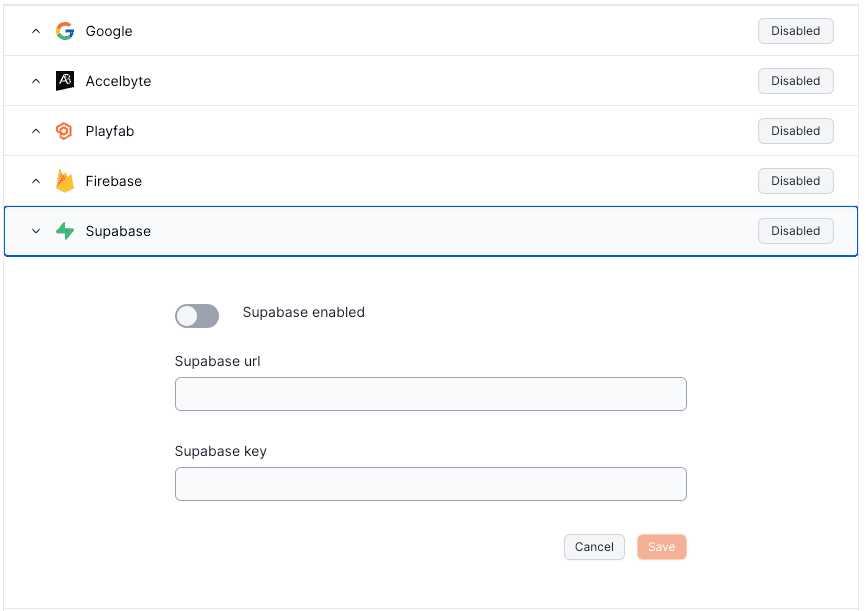 The Supabase provider stores two values, both required:
| Field | Value |
| --- | --- |
| URL | The unique Supabase URL supplied when you created the project. |
| Key | The anon key or publishable key copied above. |
Providers are configured per environment, so repeat this for each environment you ship to.
## Authenticate from your app
Configure `thirdPartyAuth` with `ThirdPartyOAuthProvider.SUPABASE` and a `getAccessToken` callback that returns the `access_token` of the current Supabase session, or `null` when there is no session.
:::code-group
```tsx [React]
import { OpenfortProvider, ThirdPartyOAuthProvider } from "@openfort/react"
(await getSupabaseAccessToken()) ?? null,
}}
walletConfig={{
shieldPublishableKey: "YOUR_SHIELD_PUBLISHABLE_KEY",
ethereum: { chainId: 84532 },
}}
>
{children}
```
```ts [JavaScript]
import { Openfort, ThirdPartyOAuthProvider } from '@openfort/openfort-js'
const openfort = new Openfort({
baseConfiguration: {
publishableKey: "YOUR_OPENFORT_PUBLISHABLE_KEY",
},
thirdPartyAuth: {
provider: ThirdPartyOAuthProvider.SUPABASE,
getAccessToken: async () => (await getSupabaseAccessToken()) ?? null,
},
})
```
:::
Call `getAccessToken()` after a Supabase sign-in resolves so Openfort verifies the token and links it to an Openfort user, and sign the user out of Openfort when the Supabase session ends. The [React guide](https://www.openfort.io/docs/products/embedded-wallet/react/auth/third-party) shows the full state-sync loop and links a runnable [Supabase quickstart](https://github.com/openfort-xyz/openfort-react/tree/main/examples/quickstarts/supabase#supabase-quickstart).
## Verify it worked
Post a Supabase access token to the third-party verification endpoint with your publishable key:
```bash
curl https://api.openfort.io/iam/v2/user/third_party \
-H "Authorization: Bearer pk_test_..." \
-H "Content-Type: application/json" \
-d '{"provider":"supabase","token":""}'
```
A verified token returns the Openfort user it resolves to:
```json
{
"id": "usr_***",
"createdAt": 123456789,
"email": "satoshi@openfort.io",
"emailVerified": true,
"isAnonymous": false
}
```
A `400` means the token was not accepted: check that the URL and key in the dashboard belong to the same Supabase project that issued the token. A `404` means no Supabase provider is configured in the same environment as the publishable key you sent. See [Errors](https://www.openfort.io/docs/api-reference/errors) for the response format.
## Related
* [Using a third-party auth provider](https://www.openfort.io/docs/configuration/external-auth) — all supported providers and the custom-auth alternatives.
* [Third-party auth headers](https://www.openfort.io/docs/api-reference/authentication) — calling the REST API with `x-auth-provider: supabase` and `x-player-token`.
* [Pregenerate wallets](https://www.openfort.io/docs/products/embedded-wallet/server/pregenerate-wallets) — create wallets ahead of first login with `thirdPartyUserId` and `thirdPartyProvider`.
The Supabase provider stores two values, both required:
| Field | Value |
| --- | --- |
| URL | The unique Supabase URL supplied when you created the project. |
| Key | The anon key or publishable key copied above. |
Providers are configured per environment, so repeat this for each environment you ship to.
## Authenticate from your app
Configure `thirdPartyAuth` with `ThirdPartyOAuthProvider.SUPABASE` and a `getAccessToken` callback that returns the `access_token` of the current Supabase session, or `null` when there is no session.
:::code-group
```tsx [React]
import { OpenfortProvider, ThirdPartyOAuthProvider } from "@openfort/react"
(await getSupabaseAccessToken()) ?? null,
}}
walletConfig={{
shieldPublishableKey: "YOUR_SHIELD_PUBLISHABLE_KEY",
ethereum: { chainId: 84532 },
}}
>
{children}
```
```ts [JavaScript]
import { Openfort, ThirdPartyOAuthProvider } from '@openfort/openfort-js'
const openfort = new Openfort({
baseConfiguration: {
publishableKey: "YOUR_OPENFORT_PUBLISHABLE_KEY",
},
thirdPartyAuth: {
provider: ThirdPartyOAuthProvider.SUPABASE,
getAccessToken: async () => (await getSupabaseAccessToken()) ?? null,
},
})
```
:::
Call `getAccessToken()` after a Supabase sign-in resolves so Openfort verifies the token and links it to an Openfort user, and sign the user out of Openfort when the Supabase session ends. The [React guide](https://www.openfort.io/docs/products/embedded-wallet/react/auth/third-party) shows the full state-sync loop and links a runnable [Supabase quickstart](https://github.com/openfort-xyz/openfort-react/tree/main/examples/quickstarts/supabase#supabase-quickstart).
## Verify it worked
Post a Supabase access token to the third-party verification endpoint with your publishable key:
```bash
curl https://api.openfort.io/iam/v2/user/third_party \
-H "Authorization: Bearer pk_test_..." \
-H "Content-Type: application/json" \
-d '{"provider":"supabase","token":""}'
```
A verified token returns the Openfort user it resolves to:
```json
{
"id": "usr_***",
"createdAt": 123456789,
"email": "satoshi@openfort.io",
"emailVerified": true,
"isAnonymous": false
}
```
A `400` means the token was not accepted: check that the URL and key in the dashboard belong to the same Supabase project that issued the token. A `404` means no Supabase provider is configured in the same environment as the publishable key you sent. See [Errors](https://www.openfort.io/docs/api-reference/errors) for the response format.
## Related
* [Using a third-party auth provider](https://www.openfort.io/docs/configuration/external-auth) — all supported providers and the custom-auth alternatives.
* [Third-party auth headers](https://www.openfort.io/docs/api-reference/authentication) — calling the REST API with `x-auth-provider: supabase` and `x-player-token`.
* [Pregenerate wallets](https://www.openfort.io/docs/products/embedded-wallet/server/pregenerate-wallets) — create wallets ahead of first login with `thirdPartyUserId` and `thirdPartyProvider`.