> **Can't find what you're looking for?** Use `search_docs` on the docs MCP server at `https://www.openfort.io/api/mcp` to find what you need.
>
> **Have feedback?** Use `submit_feedback` on the same MCP server.
# PlayFab auth
PlayFab provides backend services for building and operating online games, including server hosting, data analytics, and live operations utilities.
Openfort verifies the token your PlayFab title issues for a signed-in player and maps it to an Openfort user, so the player keeps their PlayFab account and gets an embedded wallet without a second login.
## Prerequisites
To set up your PlayFab authentication with Openfort, you need your title's **Title ID** and an Openfort project publishable key (`pk_test_` for sandbox, `pk_live_` for live).
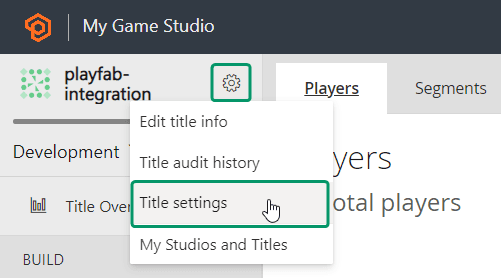
1. Visit the [PlayFab developer dashboard](https://developer.playfab.com/), select your title, and navigate to **Settings** > **Title settings**:
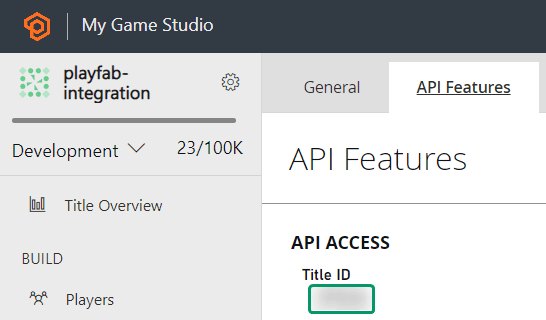
 2. In the **API Features** section, copy your **Title ID**:
 ## Set up your provider
Open your [dashboard provider settings](https://dashboard.openfort.io/providers), enable PlayFab, and paste the Title ID. It is the only credential the PlayFab provider stores, and it is required: the API rejects a PlayFab provider configuration without it. Providers are configured per environment, so repeat this for each environment you ship to.
## Authenticate from your app
Configure `thirdPartyAuth` with `ThirdPartyOAuthProvider.PLAYFAB` and a `getAccessToken` callback returning the token your PlayFab login issued for the player, or `null` when nobody is signed in.
:::code-group
```tsx [React]
import { OpenfortProvider, ThirdPartyOAuthProvider } from "@openfort/react"
(await getPlayFabToken()) ?? null,
}}
walletConfig={{
shieldPublishableKey: "YOUR_SHIELD_PUBLISHABLE_KEY",
ethereum: { chainId: 84532 },
}}
>
{children}
```
```csharp [Unity]
var openfort = await OpenfortSDK.Init(
publishableKey: "YOUR_OPENFORT_PUBLISHABLE_KEY",
shieldPublishableKey: "YOUR_SHIELD_PUBLISHABLE_KEY",
thirdPartyProvider: "playfab",
getThirdPartyToken: GetPlayFabToken
);
```
:::
Call `getAccessToken()` once your PlayFab login resolves so Openfort verifies the token and links it to an Openfort user, and sign the user out of Openfort when the PlayFab session ends. See [React](https://www.openfort.io/docs/products/embedded-wallet/react/auth/third-party), [JavaScript](https://www.openfort.io/docs/products/embedded-wallet/javascript/auth/external-auth), or [Unity](https://www.openfort.io/docs/products/embedded-wallet/unity/auth/third-party) for the full state-sync loop.
## Verify it worked
Post a PlayFab token to the third-party verification endpoint with your publishable key:
```bash
curl https://api.openfort.io/iam/v2/user/third_party \
-H "Authorization: Bearer pk_test_..." \
-H "Content-Type: application/json" \
-d '{"provider":"playfab","token":""}'
```
A verified token returns the Openfort user it resolves to:
```json
{
"id": "usr_***",
"createdAt": 123456789,
"email": "satoshi@openfort.io",
"emailVerified": true,
"isAnonymous": false
}
```
A `400` means the token was not accepted: check that the Title ID in the dashboard matches the title that issued the token. A `404` means no PlayFab provider is configured in the same environment as the publishable key you sent. See [Errors](https://www.openfort.io/docs/api-reference/errors) for the response format.
## Related
* [Using a third-party auth provider](https://www.openfort.io/docs/configuration/external-auth) — all supported providers and the custom-auth alternatives.
* [Third-party auth headers](https://www.openfort.io/docs/api-reference/authentication) — calling the REST API with `x-auth-provider: playfab` and `x-player-token`.
* [Pregenerate wallets](https://www.openfort.io/docs/products/embedded-wallet/server/pregenerate-wallets) — create wallets ahead of first login with `thirdPartyUserId` and `thirdPartyProvider`.
## Set up your provider
Open your [dashboard provider settings](https://dashboard.openfort.io/providers), enable PlayFab, and paste the Title ID. It is the only credential the PlayFab provider stores, and it is required: the API rejects a PlayFab provider configuration without it. Providers are configured per environment, so repeat this for each environment you ship to.
## Authenticate from your app
Configure `thirdPartyAuth` with `ThirdPartyOAuthProvider.PLAYFAB` and a `getAccessToken` callback returning the token your PlayFab login issued for the player, or `null` when nobody is signed in.
:::code-group
```tsx [React]
import { OpenfortProvider, ThirdPartyOAuthProvider } from "@openfort/react"
(await getPlayFabToken()) ?? null,
}}
walletConfig={{
shieldPublishableKey: "YOUR_SHIELD_PUBLISHABLE_KEY",
ethereum: { chainId: 84532 },
}}
>
{children}
```
```csharp [Unity]
var openfort = await OpenfortSDK.Init(
publishableKey: "YOUR_OPENFORT_PUBLISHABLE_KEY",
shieldPublishableKey: "YOUR_SHIELD_PUBLISHABLE_KEY",
thirdPartyProvider: "playfab",
getThirdPartyToken: GetPlayFabToken
);
```
:::
Call `getAccessToken()` once your PlayFab login resolves so Openfort verifies the token and links it to an Openfort user, and sign the user out of Openfort when the PlayFab session ends. See [React](https://www.openfort.io/docs/products/embedded-wallet/react/auth/third-party), [JavaScript](https://www.openfort.io/docs/products/embedded-wallet/javascript/auth/external-auth), or [Unity](https://www.openfort.io/docs/products/embedded-wallet/unity/auth/third-party) for the full state-sync loop.
## Verify it worked
Post a PlayFab token to the third-party verification endpoint with your publishable key:
```bash
curl https://api.openfort.io/iam/v2/user/third_party \
-H "Authorization: Bearer pk_test_..." \
-H "Content-Type: application/json" \
-d '{"provider":"playfab","token":""}'
```
A verified token returns the Openfort user it resolves to:
```json
{
"id": "usr_***",
"createdAt": 123456789,
"email": "satoshi@openfort.io",
"emailVerified": true,
"isAnonymous": false
}
```
A `400` means the token was not accepted: check that the Title ID in the dashboard matches the title that issued the token. A `404` means no PlayFab provider is configured in the same environment as the publishable key you sent. See [Errors](https://www.openfort.io/docs/api-reference/errors) for the response format.
## Related
* [Using a third-party auth provider](https://www.openfort.io/docs/configuration/external-auth) — all supported providers and the custom-auth alternatives.
* [Third-party auth headers](https://www.openfort.io/docs/api-reference/authentication) — calling the REST API with `x-auth-provider: playfab` and `x-player-token`.
* [Pregenerate wallets](https://www.openfort.io/docs/products/embedded-wallet/server/pregenerate-wallets) — create wallets ahead of first login with `thirdPartyUserId` and `thirdPartyProvider`.